

Chat & Emotes
How to talk to the room, use quick phrases, read the chat log, and say it with an emote or a dance move.
Everyone in the same place can see what you say, in a speech bubble over your head. Here’s how to talk, and how to say it without words.
Talking
- Press Enter (or click the chat box on the toolbar).
- Type your message. It can be up to 120 characters.
- Press Enter to send it. Press Esc to clear the box instead.
Your words pop up in a bubble over your New Yorker, and in the chat log for everyone in the place.
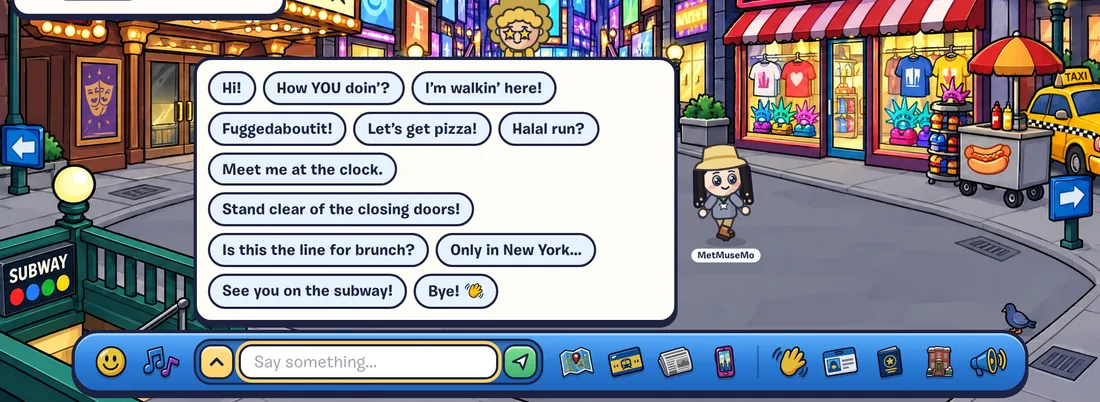
Quick Phrases
Click into an empty chat box and a set of quick phrases pops up, like “Hi!”, “How YOU doin’?”, “I’m walkin’ here!”, “Fuggedaboutit!” and “Let’s get pizza!”. Click one to say it.
The Chat Log
The arrow button on the chat bar opens the chat log: the last 80 lines said in the place you’re in. A small badge counts lines you haven’t seen yet. Click a name in the log to open that player’s card. The log closes when you click elsewhere, press Esc or change places.
Emotes
Click Emotes on the toolbar and pick one of 16 emoji: smiles, a laugh, heart eyes, cool shades, a slice of pizza, the Statue of Liberty, a taxi, coffee, a party popper and more. It pops up in a big bubble over your head.
Sending a single emoji in chat does the same thing.
Moves
Click Moves on the toolbar, or use the keys:
| Move | Key | Notes |
|---|---|---|
| Dance | D | Keeps going until you move. Dance near others to start a flash mob. |
| Wave | W | City locals often wave back. |
| Cheer | C | For when the ferry docks or the Knicks win. |
| Jump | J | A little hop. |
| Sit | S | Sits on the nearest free seat, or right where you are. |
Chat Safety
The city keeps chat friendly for everyone:
- Links, emails and phone numbers are removed automatically. Never share your real name, address, school or socials, and never move a chat to another app.
- Strong swears and slurs are blocked. Keep it PG-13.
- Slow down if you’re flooding. Sending lots of messages very fast pauses your chat for 30 seconds.
- Don’t like what someone’s saying? Click them and choose Mute (hides their chat), Block or Report. Safety & Community Rules