
Inviting Friends
Every New Yorker has a personal invite link. Friends who use it land right next to you, you're friends from the start, and you both get coins.
The best way to play Club NYC is with people you know. Your invite link brings them straight to you.
Your Invite Link
Open the Phone on the toolbar and pick Invite Friends (or press I).
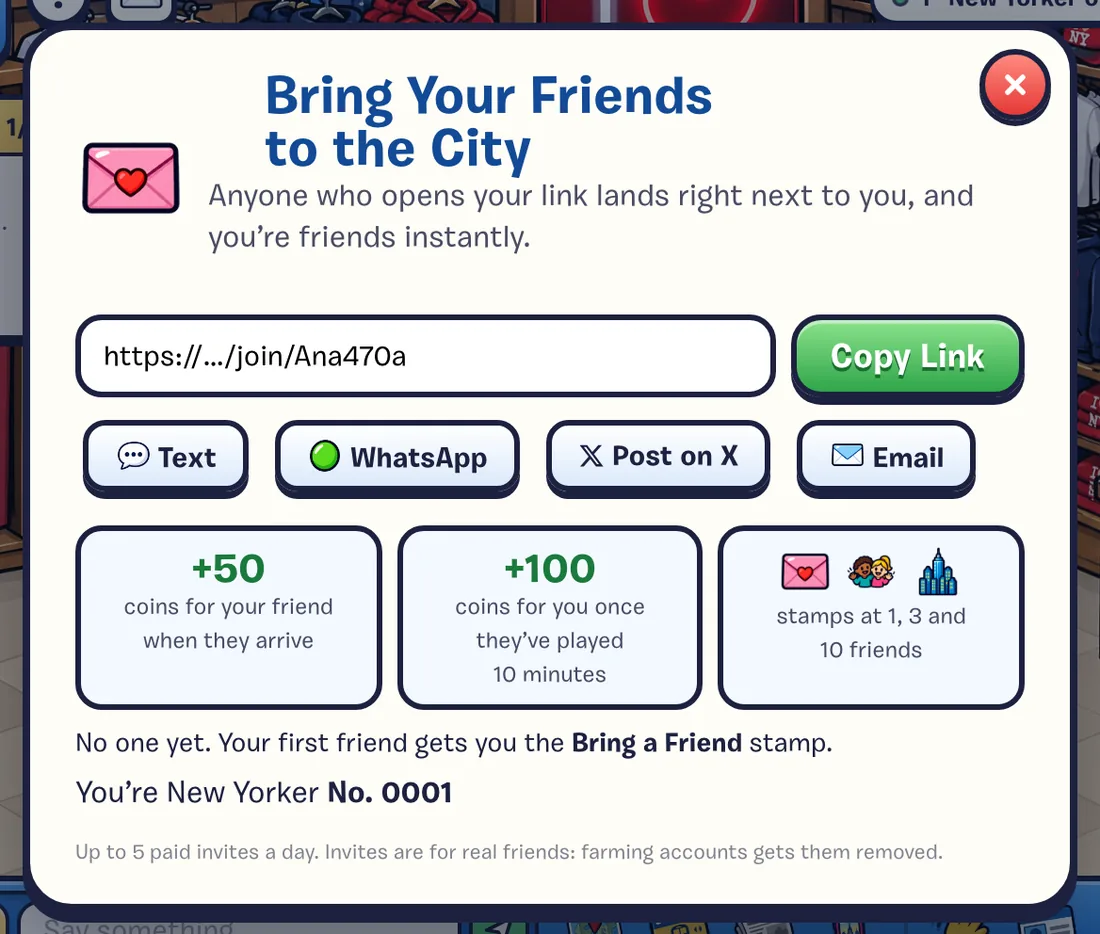
- Copy Link copies your personal link (it ends in /join/ and your name).
- Share it by text, WhatsApp, X or email, right from the panel.
- When someone opens it, they see “YourName invited you to Club NYC!”, make their New Yorker, and land right next to you. You’re friends from the start.
Invites work when you’re playing online. The invite is remembered in your friend’s browser for a week, so they don’t have to start right away.
Rewards
| Who | What | When |
|---|---|---|
| Your friend | 50 coins welcome bonus | When they arrive |
| You | 100 coins | Once they’ve played for 10 minutes |
| You | 50 XP | When a friend joins |
| You | Bring a Friend, Your Crew and Mayor of the Block stamps | At 1, 3 and 10 friends |
Up to 5 invites a day pay coins, and up to 50 in all. Invites are for real friends: farming extra accounts gets them removed. Play fair
Other Ways to Bring People In
- The City tab (F) has a quick link to share when the city is quiet.
- Your MetroCard. When you make your New Yorker, you can save a picture of your MetroCard. It shows your invite link.
- Leaderboard brags. A top 3 spot on a weekly job leaderboard gives you a Tell Your Friends button that copies a brag with your link in it.