Friends & Community

Friends, Chat & Community
Who's in the city, your friends, invites, Neighborhood Wars and the leaderboards, all from one panel.
On This Page
Club NYC is better with people. Everything social lives in the Friends & Leaderboards panel: press F or click the waving hand on the toolbar.
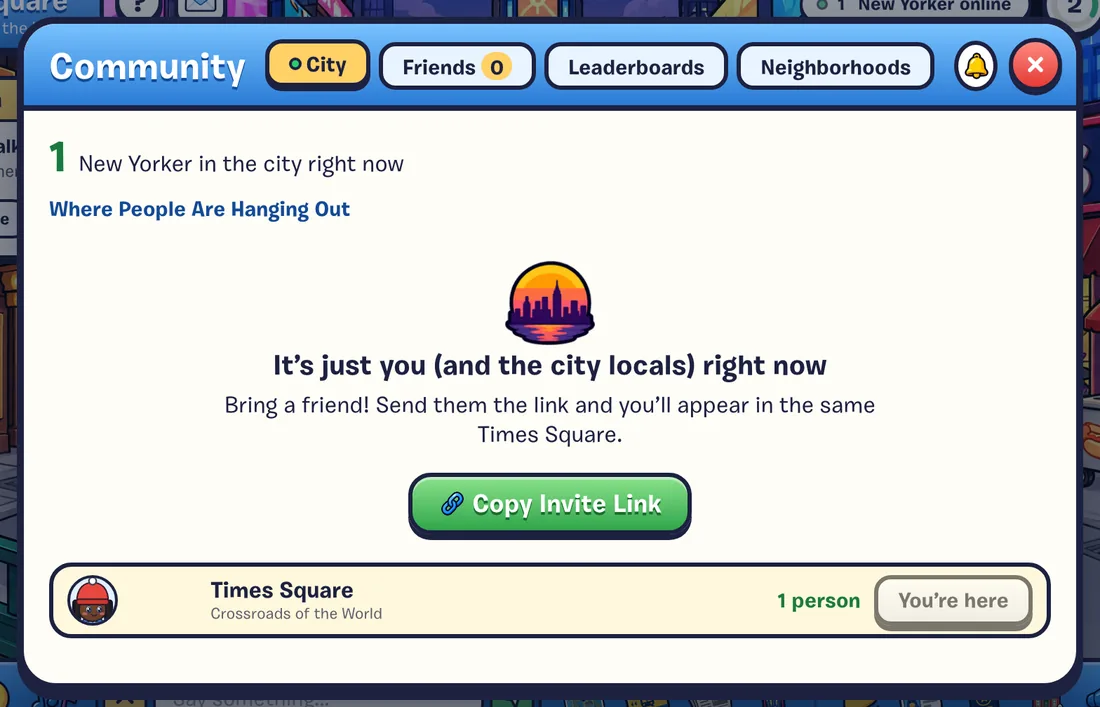
The Tabs
| Tab | What’s there |
|---|---|
| City | How many New Yorkers are in the city right now, friends who are out and about, and the busiest places, each with a Go button. (Online only.) |
| Friends | Friend requests, your friends (online first) with where they are, a button to visit their place, people in the place you’re in, and your blocked list. Friends |
| Games | The multiplayer games: Quick Match, Create Lobby, and a box for a friend’s code. Multiplayer Games |
| Leaderboards | This week’s best shifts at every job, for everyone or just your friends. Leaderboards |
| Neighborhoods | Neighborhood Wars: this week’s standings and your team. Neighborhood Wars |
The bell button turns city updates on or off. When it’s off, friends coming online and other ambient notes stay quiet. Things people do to you (like a friend request) still show.
In This Section
 FriendsAdd friends, go to them, text them, visit their place.
 Inviting FriendsYour invite link, and coins for both of you.
 Neighborhood WarsPick a team and help it win the week.
 LeaderboardsWeekly and all-time bests for every job.
 Postcards & NoticesThe envelope at the top left, and the notes at the bottom right.
 Playing OnlineHow the shared city works, reconnecting, and playing offline.
Chat
Press Enter to talk to everyone in the place you’re in. Chat & Emotes