

Friends
Add friends, accept requests, see where your friends are, go to them in one click, text them, and visit their place.
Friends see where each other are, can visit each other’s apartments any time, and can text each other to meet up.
Adding a Friend
- Click a New Yorker to open their player card.
- Click Add Friend.
- They get a notice (“wants to be friends!”) with Accept and Later buttons. When they accept, you’ll hear about it.
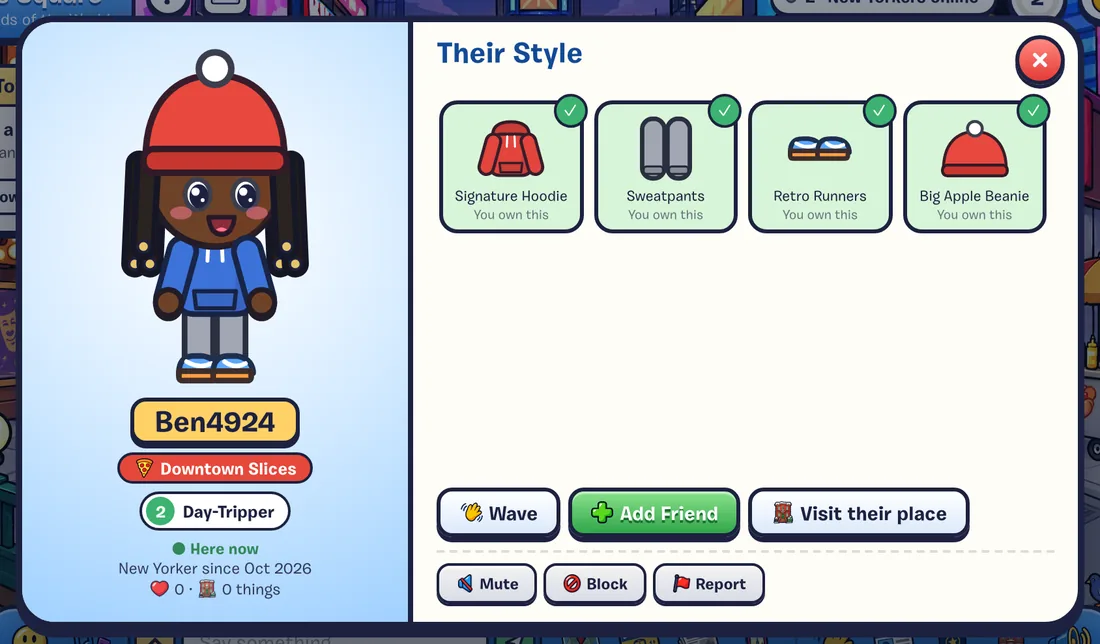
If they’d already asked you, you’re friends right away. You can also add people from Friends & Leaderboards (F): the Friends tab lists everyone in the place you’re in, with Add Friend buttons.
Friend Requests
Requests show up as a notice when you’re online, and wait in the Friends tab under Friend Requests with Accept and Ignore buttons. Ignoring a request quietly removes it.
Finding Your Friends
Press F and open Friends. Online friends are at the top with where they are.
- Go takes you to them: across the city, to their copy of a busy place, or into their apartment.
- The home button visits their place, even when they’re offline.
- When a friend comes online, you get a notice with a Go button (unless city updates are muted with the bell).
Text a Friend
Open the Phone on the toolbar and pick Text a Friend (or press T). Choose a friend who’s online and send one of these:
| Text | What they get |
|---|---|
| Meet Me Here | “Meet me in Times Square!” with a Go button that brings them to you |
| Say Hi | A friendly hello, with a Say Hi Back button |
| Play a Game? | An invite to play, with a Go button |
Texts are presets only, between friends only, so there’s nothing to moderate. You can send one every few seconds per friend. Texting works when you’re playing online.
Visiting a Friend’s Place
Friends can visit each other’s apartments any time, even when the owner’s away. Click their card’s Visit Their Place, or the home button in your friends list. Visitors & Guestbooks
Unfriending, Muting and Blocking
From someone’s player card:
- Unfriend removes them from your friends (no announcement).
- Mute hides their chat and emotes for this session.
- Block hides them and their chat, and stops friend requests and guestbook notes between you. They aren’t told. Unblock them any time from the Blocked list at the bottom of the Friends tab.
- Report sends their recent chat to the moderators. Safety & Community Rules
Stamps
| Stamp | How |
|---|---|
| New Friend | Make your first friend. |
| Social Butterfly | Have 5 friends. |
| House Call | Visit a friend’s apartment. |
| Dear Diary | Sign a friend’s guestbook. |